
Is Pika the Right AI Video Tool for You?
Pika is an AI video generator built for short, stylized clips that get shared, not for photoreal filmmaking. Its Pikaffects library applies one-tap

Disclosure: Some links on this page are affiliate links. We may earn a commission if you purchase through them — at no extra cost to you.
Pika is an AI video generator built for short, stylized clips that get shared, not for photoreal filmmaking. Its Pikaffects library applies one-tap physics effects no competitor matches at this price, a Turbo clip generates in roughly 12 seconds, and the Standard plan starts at $8/mo a month when billed yearly. The limits are just as real: base clips cap around 10 seconds, photoreal humans fall apart, failed generations still burn credits, and support reviews are weak. This guide covers what Pika does well, what it actually costs, how it stacks up against Kling, Runway, HeyGen, Sora and Veo, and who should buy it.
In this guide


01 The 30-second verdict
Buy Pika if you make short, loud, shareable video and want effects nobody else ships at this price. Standard runs $8 a month billed yearly, the cheapest commercial entry point in AI video, and Pikaffects is genuinely one of a kind.
Don’t buy Pika if you need synced dialogue, photoreal humans, clips longer than about 10 seconds, or contractual cover for client work. Kling, Runway, Veo and Sora own that territory, at their prices.
Pika is the most fun $8 in AI video, with hard limits. Treat it as a specialist effects tool rather than your only video generator.
02 What Pika is (and isn’t)
Pika (formerly Pika Labs) is an idea-to-video platform that turns a text prompt, an image, or an existing clip into a short animated video. The current model is Pika 2.5, which outputs up to 1080p and generates base clips of about 5 to 10 seconds, extendable to roughly 25 seconds with Pikaframes.
Pika’s positioning is honest: it optimizes for stylized, playful, mobile-first social video, not photoreal cinema. The company was founded in 2023 by Stanford students Demi Guo and Chenlin Meng and has raised a reported $135 million at a ~$470 million valuation. Beyond the web app, the ecosystem now includes Pika Agent (a collaborative AI creative partner), Pika MCP (which gives other agents access to Pika’s creative models), a Pika Video App, and an AI Trendmaker that drops you into viral formats with a selfie and a sound.
03 Core features & modules
Generation modes
- Text-to-Video – style-aware prompts (anime, watercolor, cyberpunk); Pika responds well to aesthetic descriptors.
- Image-to-Video – animate a still; the Inflate feature adds simulated 3D depth and parallax, handy for product shots.
- Video-to-Video – paid only.
The effect suite (why people actually pay)
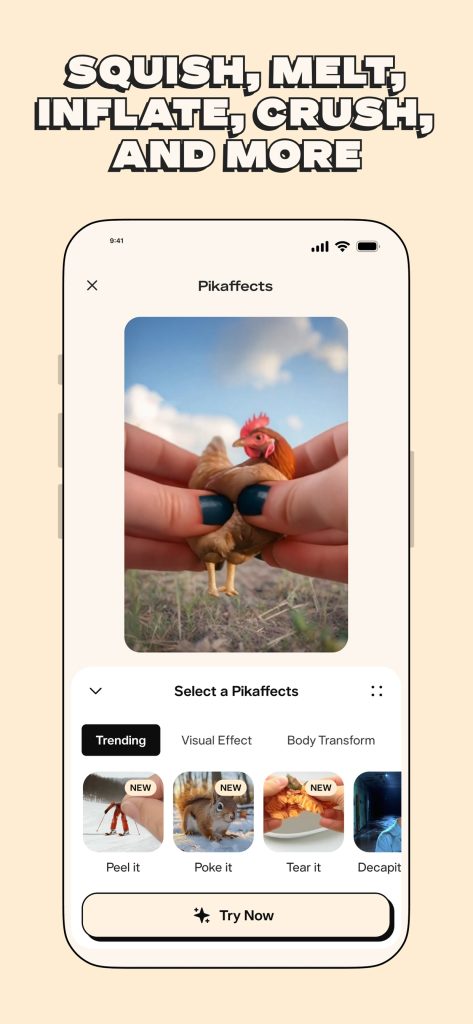
- Pikaffects – one-tap physics effects unique to Pika: Squish, Cake-ify, Melt, Explode, Inflate/Deflate, Crumble, Crush, Dissolve, Eye-pop, Levitate, Peel, Poke, Tear (14+). You upload an image or clip, pick an effect, hit generate, and a usable 3-5s clip lands in 20-45 seconds. No rival ships a “Cake-ify” button.
- Pikaframes – start/end frame keyframing for compositional control; extends clips toward ~25s.
- Pikascenes – build scenes and swap characters, backgrounds, wardrobe.
- Pikadditions – drop objects into a scene.
- Pikaswaps – swap subjects or objects.
- Pikatwists – change the action or style mid-clip (60 credits Turbo / 80 Pro).
- Pikaformance – lip-sync / talking faces; 3 credits per second.
- Integrated Sound Effects – physics-driven SFX (footsteps, glass, water) synced to on-screen action. On top of that, Pika launched a full audio lineup in August 2026 (see below).
04 Pricing & the credit reality
Pika is credit-based. All prices below are annual billing (monthly billing costs about 20% more). Verified against pika.art/pricing:
| Plan | Monthly billing | Annual billing (per month) | Monthly credits | Core benefits & restrictions |
|---|---|---|---|---|
| Basic (Free) | $0 | $0 | 80 monthly credits | Pika 2.5 at 480p only, Pikascenes/Pikadditions/Pikaswaps/Pikatwists, Pikaffects image-to-video only; no watermark; commercial use included |
| Standard | $10 /user/mo | $8 /user/mo ($96/year) | 700 per month | Pika 2.5 at all resolutions, Pikaframes, all Pikaffects; fast generations; no watermark; commercial use |
| Pro | $35 /user/mo | $28 /user/mo ($336/year) | 2,300 per month | Faster generations, Pika 2.5 at all resolutions, Pikaframes, all Pikaffects; no watermark; commercial use |
| Fancy | $95 /user/mo | $76 /user/mo ($912/year) | 6,000 per month | Fastest generations, Pika 2.5 at all resolutions, Pikaframes, all Pikaffects; no watermark; commercial use |
Per-clip credit cost (Pika 2.5, official page): 480p 5s = 12 free / 24 paid; 720p = 20 / 40; 1080p = 40 / 80 (5s / 10s). Pikaffects = 15 credits free / 18 paid. Pikaformance = 3 credits/second. Purchased credit packs roll over indefinitely, while monthly credits reset each cycle.
One note worth checking before you subscribe: Pika’s pricing page lists no-watermark downloads and commercial use on every plan, including the free Basic tier. Entitlements on pika.art change occasionally, so confirm the live terms at pika.art/pricing before you commit, especially if you plan to publish client or branded work.
The number to watch is the failure tax. Independent testers put the share of generations that fail or come back unusable at roughly 26% (Toolspect) to 30-50% (Litmus), and failed generations still spend credits with no refund. That is the single most common complaint behind Pika’s poor support ratings. Plan for 3-5 attempts per clip you actually keep.
05 Pros
What works
What doesn’t
06 Scale & reputation
Pika has raised a reported $135M at a ~$470M valuation and runs a large, active Discord and Reddit community. On raw output fidelity, Pika 2.5 lands around #7-8 on the Artificial Analysis Video Arena for image-to-video, behind Kling 3.0, Runway Gen-4.5, Seedance 2.0 and PixVerse V6. The leaderboard misses the point, though: people pay for Pikaffects.
Reviewer scores vary widely – Litmus 74/100, aitoolspolice 3.2/5, OnyxRanked 4.1/5, ToolJunction 3.8/5, aivideopicks 8.0/10 – reflecting the split between “best toy in the category” and “frustrating to budget around.” The Trustpilot score (~1.6-1.9/5) is poor, but it’s a self-selected unhappy tail whose complaints are about credits, billing and support, not about how the videos look.
07 Pika vs the field
| Vs | Pika’s edge | Their edge |
|---|---|---|
| Kling | Effects, speed, cheapest commercial entry, simpler UI | Photorealism, physics, longer clips (up to ~3 min via extension), bigger free tier (66 daily credits) |
| Runway | Faster and cheaper; playful effects | Cinematic control, editing suite, reliability |
| HeyGen | Generative scenes | Presenter / talking-head videos (no real overlap) |
| Sora / Veo | Speed, fun, price | Photorealism, length, native audio |
Sources: OnyxRanked, Toolspect, AI Tool Radar – head-to-head sections.
08 Who should buy / skip
Buy Pika if you are
Skip Pika (or pair it) if you need
09 Recommended plan by use case
| Use case | Plan | Why |
|---|---|---|
| Testing the vibe | Free | 80 refilling credits; 480p, no watermark, commercial use allowed |
| Personal social posting | Standard ($8/mo) | 700 credits, 1080p, no watermark, commercial use |
| Client / branded / agency work | Pro ($28/mo) | Faster queue, all resolutions and effects, no watermark, commercial use |
| High-volume teams | Fancy ($76/mo) | 6,000 credits, fastest queue |
10 Final verdict
Pika is the best toy in AI video, and the smartest buy for short, effect-driven social content at $8 a month. Its Pikaffects library and roughly 12-second generation speed have no equal at the price, and the free tier is a genuine on-ramp. But it’s a specialist, not a studio: silent base clips, a real failure rate that still costs credits, weak photoreal humans, a 10-second ceiling, and a support/billing reputation worth weighing. Use Pika for what it uniquely does, and keep a realism-first tool like Kling, Runway or Veo beside it.
11 Frequently asked questions
Is Pika free to use?
Yes. Pika’s Basic plan is free and includes 80 video credits each month. Free generations run at 480p and still download without a watermark, with commercial use allowed. It’s enough to test Pikaffects and the core models before paying.
How much does Pika cost?
Pika has three paid plans, priced for annual billing: Standard at $8/month (700 credits), Pro at $28/month (2,300 credits), and Fancy at $76/month (6,000 credits). Monthly billing costs about 20% more.
What is Pika best at?
Short, playful, effect-driven social clips. Pikaffects (Squish, Melt, Cake-ify, Explode and more) apply one-tap physics effects, and generation is among the fastest in the category. Pika is not built for photoreal cinema or long-form video.
What are Pikaffects?
Pikaffects are one-tap physics effects unique to Pika. You upload a photo or clip, pick an effect like Squish, Cake-ify, Melt, Explode or Crumble, and get a short animated clip. They’re the main reason most people pay for Pika.
How long can a Pika video be?
Base clips run 5 to 10 seconds. Pikaframes extends clips to roughly 25 seconds using start/end frame keyframes. Pika is a short-clip tool, not a long-form generator.
Does Pika add a watermark?
No. Every plan, including the free Basic tier, downloads videos without a watermark, according to Pika’s pricing page.
Can I use Pika videos commercially?
Yes. Pika lists commercial use on all plans, including the free tier. If you’re doing client or branded work, still confirm the live terms on Pika’s pricing page, since entitlements can change.
Does Pika generate audio, music, or voice?
Pika launched a full audio lineup in August 2026: Pika Soundtrack (full-scene sound), Pika Music, Pika SFX, and Pika Speech (text-to-speech with voice cloning). These run through the Pika API Club, while standard video generations still produce video without baked-in audio.
Disclosure: Some links on this page are affiliate links. We may earn a commission if you purchase through them — at no extra cost to you.
Was this review helpful?
Thanks for your feedback!