
How to Use Speechify — Full Guide

Disclosure: Some links on this page are affiliate links. We may earn a commission if you purchase through them — at no extra cost to you.
Speechify (https://speechify.com/)is a text-to-speech / AI voice / AI podcast / voice-agent platform. The practical usage splits into three paths:
- Listen — Speechify Reader (web, Chrome extension, iOS, Android, desktop)
- Create — Speechify Studio (AI voice overs, dubbing, podcasts, avatars, transcription)
- Build — Speechify API & Voice Agents (embed TTS / conversational voice AI into your product)
Explore all of Speechify’s features right from the homepage. Find what fits your workflow and try it out — one of them will be just right for you.
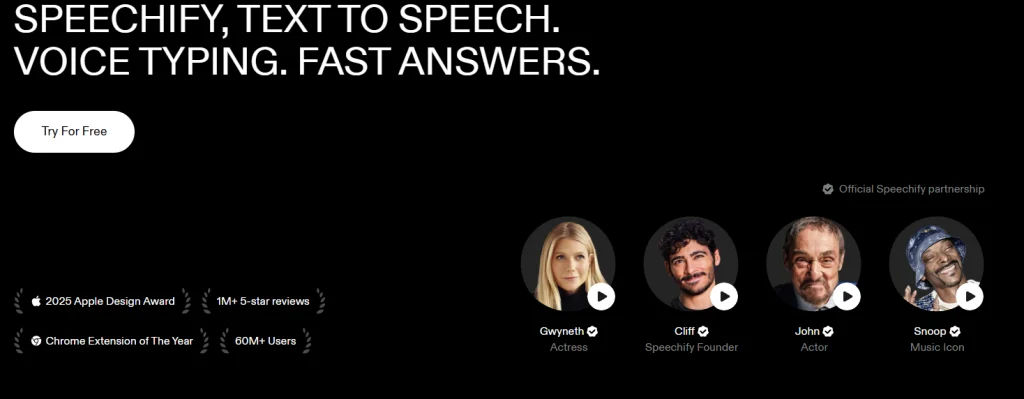
Head to the site, open the top menu, and click “Use Cases.” You can test all four features without an account. Like what you see? Pick the one that fits your workflow, sign up, and dive into the full feature set.
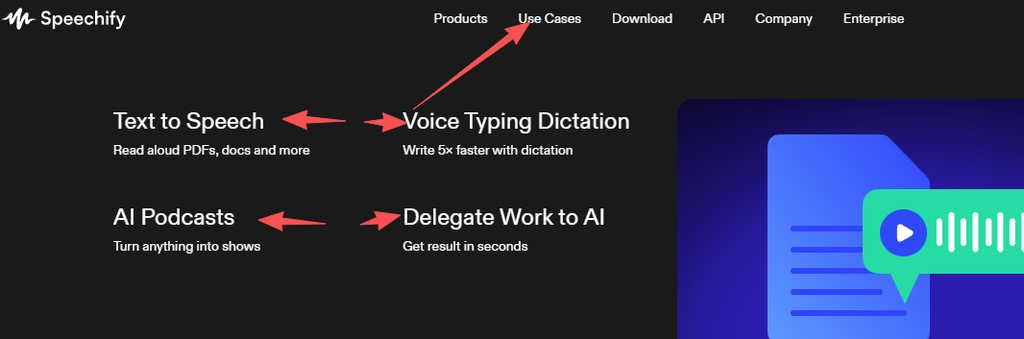
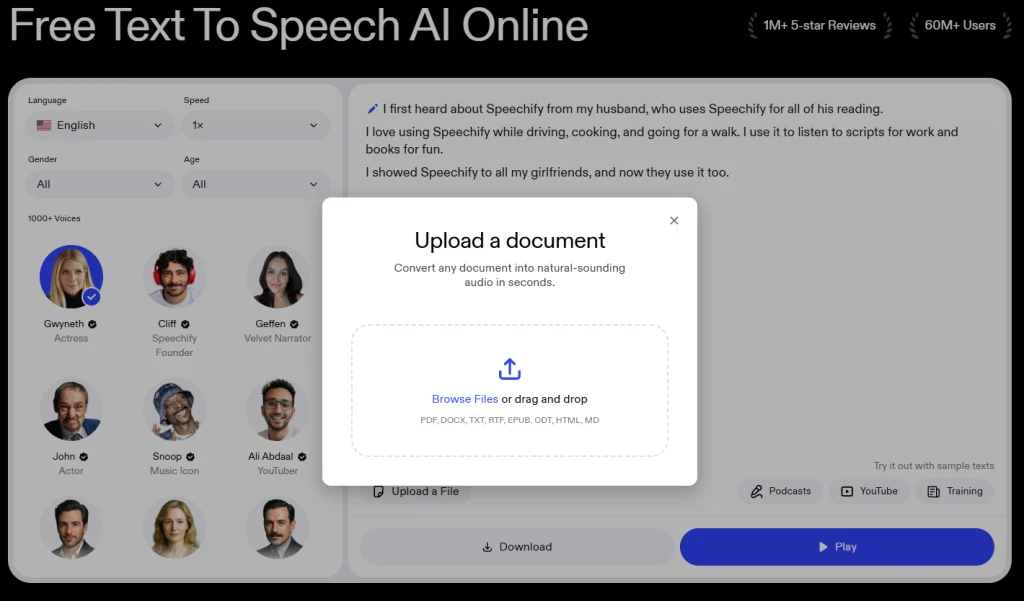
If you select “Text to Speech,” you’ll be taken directly to the interface below.
Below is a quick overview of everything you care about — Speechify’s key features, pricing, ratings, and more.
1. Speechify Reader — Listen to Any Text
Web app
- Go to
speechify.comand sign up / log in. - Click New or +.
- Choose:
- Local document → upload PDF / DOCX / TXT / EPUB
- Paste text → paste an article or script
- Paste link → import a web page
- Cloud import → Google Drive / Dropbox / OneDrive
- Open the item.
- Pick a voice (200+ AI voices, 30–60+ languages).
- Set speed (commonly 1.0x → 1.5x → 2.0x–3.0x).
- Press play — text highlights word-by-word.
Chrome extension
- Install Speechify from Chrome Web Store.
- Pin the icon.
- Open any article or online PDF.
- Click the Speechify icon → blue play button.
- Speechify extracts the article and reads it aloud.
Mobile (iOS / Android)
- iOS: copy a URL → open Speechify → tap + → Paste Link; or use Safari Share → Speechify.
- Android: tap + → Paste Link / File / Drive.
- Library + playback position sync across web, mobile, and desktop.
- Background playback, lock screen controls, and CarPlay are supported.
Beginner tip: start at 1.0x, move to 1.5x for news, 2.0x–3.0x for familiar content, and slow back to 1.0x when proofreading.
2. Speechify Studio — Create AI Voice Content
Use this for YouTube narration, course audio, podcast episodes, multilingual dubbing, and AI avatar videos.
AI Voice Over
- Open Speechify Studio.
- Click New Project → Voice Over.
- Click Import and paste/upload a script.
- Split by paragraph or sentence on the timeline.
- Pick a voice; assign different voices to different blocks.
- Adjust:
- Speed
- Pitch
- Volume
- Speaking tone / emotion (on “Expressions” voices)
- Pronunciation library
- Manual pauses
- Generate → preview → Export MP3 / WAV / OGG.
AI Podcast
- Write a conversational script.
- Choose one host voice or multiple speakers.
- Generate episode audio.
- Add intro/outro music.
- Export and publish to your podcast host.
AI Dubbing
- Upload a video or paste a YouTube link.
- Choose target language(s).
- Speechify translates + regenerates natural-sounding narration.
- Export localized video/audio.
Voice Cloning
- Record a clean 10–30s sample (consent required).
- Clone your voice or a verified speaker voice.
- Use it across supported languages/voices where the plan allows.
Transcription
- Upload audio/video or paste a YouTube URL.
- Get text, subtitles (.srt/.vtt), and editable blocks.
- Repurpose into blog posts, show notes, or social clips.
3. Speechify API — Add TTS to Your Website / App
Best for: “🔊 Listen to this review” buttons, multilingual audio, voice assistants, IVR, and SaaS products.
Quick start
pip install speechify-api
# or
npm install @speechify/api
Set your key:
export SPEECHIFY_API_KEY="your-api-key"Minimal TTS call:
curl -X POST https://api.speechify.ai/v1/audio/speech
  -H "Authorization: Bearer $SPEECHIFY_API_KEY"
  -H "Content-Type: application/json"
  -d '{
    "input": "Hello from Speechify API.",
    "voice_id": "geffen_32",
    "audio_format": "mp3",
    "model": "simba-3.2"
  }'
Use cases:
- File synthesis → audiobooks, fixed clips, IVR prompts
- Streaming → voice agents, live read-aloud, chatbots
- SSML → pauses, pitch, rate, emphasis
- Speech marks → word-level highlighting / captions
4. Speechify Voice Agents — Conversational Voice AI
A Voice Agent bundles:
- a system prompt
- a voice
- an LLM
- STT + TTS pipeline
Example agent payload:
{
  "name": "Support Bot",
  "prompt": "You are a friendly support agent for a SaaS product.",
  "first_message": "Hi, this is Sabrina with support. How can I help today?",
  "voice_id": "sabrina",
  "language": "en",
  "llm_model": "gpt-4o-mini",
  "temperature": 0.7
}
Flow:
- Create agent via API or console.
- Start a conversation → Speechify provisions a LiveKit room.
- Caller connects with a short-lived token.
- User speaks → STT → LLM → TTS response.
- Inspect transcripts and post-call evaluations in the console.
Note: agent voices use a smaller curated catalog (
sabrina,carly,dominic,lyla). Personal/cloned voices are usually TTS-only.
5. Typical Workflows
| Goal | Path |
|---|---|
| Listen to AI tool reviews while walking | Speechify Reader + Paste Link |
| Turn blog post into podcast | Studio → AI Voice Over / AI Podcast |
| Localize YouTube video | Studio → AI Dubbing |
| Add “Listen” button to AIBestNav | Speechify API |
| Build voice assistant for your site | Speechify Voice Agents |
| Make course audio in your own voice | Studio → Voice Cloning |
6. Plans & Pricing (2026)
| Product | Free | Paid |
|---|---|---|
| Speechify Reader | Limited voices, standard speed | Premium ~$29/mo |
| Speechify Studio | Drafts only, no export on free | Basic ~69/mo,Pro 99/mo, Enterprise custom |
| Speechify API | 50K chars/mo, 60 agent mins | Starter 10,Pro99, Scale $499, Enterprise custom |
Important: $139 is usually the annual Reader price, not monthly. Reader, Studio, and API are billed separately.—–Prices vary by platform. Web annual total is $138.96; iOS shows $139.99/yr; Android $99.99/yr. Always check the checkout screen before paying.
7.Speechify Ratings & Reviews
Speechify does not have one single “official star rating” — scores vary by platform. When writing a review, don’t just quote 4.7; break it down by source.
7.1 Ratings by Platform (2026)
| Source | Rating | Sample Size | What It Reflects |
|---|---|---|---|
| Apple App Store | 4.7 / 5 | 500K+ ratings (officially “500K+ 5-star”) | Mobile listening experience; accessibility users love it most |
| Trustpilot | 4.7 / 5 | ~6.6K reviews | Support, refunds, subscription experience — highly polarized |
| Google Play | 4.0–4.2 / 5 | 280K+ | Android: more Kindle / Drive / PDF pausing issues |
| Capterra | 4.2 / 5 | Smaller sample | Work/education; natural voices praised, support criticized |
| Chrome Web Store | 4.6 / 5 | 21K reviews | Extension text-selection reading |
| G2 | Rarely listed separately | — | Not Speechify’s main battleground |
| Official claim | “1M+ 5-star reviews” | Marketing | Not an independent review |
7.2 Overall Score
- By platform: App Store 4.7 · Trustpilot 4.7 · Google Play 4.2 · Capterra 4.2 · Chrome 4.6
- Editorial aggregate: 4.3–4.5 / 5
- One-liner: “High marks for voice quality; deducted points for subscriptions and refunds.”
7.3 Why the High Scores
Natural voices, cross-platform, high value for dyslexic / ADHD / visually impaired / commuting learners, 2025 Apple Design Award, Chrome Extension of the Year.
7.4Why the Low Scores
$139 annual one-time charge, trial auto-converting to paid, hard cancellation, slow refunds; Android PDF/Kindle stuttering; robotic free-tier voices; unclear celebrity-voice commercial licensing.
Speechify scores 4.7/5 on App Store (500K+ ratings) and 4.7/5 on Trustpilot (~6.6K reviews), but 4.2/5 on Google Play and 4.2/5 on Capterra. Voices and accessibility are loved; billing, cancellations, and Android stability are the main complaints. Aggregate editorial score: 4.4/5.
8. Who Should Use Speechify ✅
| User Type | Why Speechify Fits |
|---|---|
| Students (especially dyslexic / ADHD) | Listening while text highlights improves comprehension & retention; AI quizzes/summaries for exam prep |
| Busy professionals | Converts reports, email threads, Google Docs into audio for commutes & workouts |
| Avid readers with eye strain | Listen instead of reading — gives your eyes a break |
| Visually impaired users | Polished, reliable TTS with OCR; supported by DSA / Access to Work programs |
| Language learners & multilingual users | 60+ languages and regional accents |
| Content creators (light use) | Studio: AI voice overs, AI podcasts, dubbing, voice cloning from scripts |
9. Who Should Skip Speechify ❌
| User Type | Why Not |
|---|---|
| Casual / occasional listeners | Free browser/OS TTS handles 80% of needs; $139/yr is overkill |
| Professional content creators | Core product isn’t built for high-end voiceover — ElevenLabs, Murf, Play.ht are stronger |
| Developers needing an API | Speechify has limited public API vs ElevenLabs API, Amazon Polly, Google Cloud TTS |
| Budget-conscious users | NaturalReader / built-in OS features are cheaper |
| Non-English heavy users | Chinese, Arabic, etc. have fewer voices and less natural intonation than English |
| Offline-only users | Web app + Chrome extension need internet; mobile supports offline only after pre-loading |
10. Main Competitors
| Tool | Primary Focus | Price (from) |
|---|---|---|
| ElevenLabs | Highest-fidelity voice generation & cloning (creators/developers) | $6/mo |
| Murf AI | Studio-grade voiceovers, timeline editor (corporate video / e-learning) | $19/mo |
| NaturalReader | Budget-friendly document reading, 100+ languages, MP3 export | Free / ~$99/yr |
| Play.ht | Large voice library, dialogue mode, podcasting | Free / $31/mo |
| Lovo | Video creation + voice acting | ~$25/mo |
| Descript | Video & podcast editing with TTS | — |
| Built-in OS TTS (Edge Read Aloud, Apple Spoken Content, Google Read Aloud) | Basic casual listening | Free |
11. Head-to-Head Comparison
Speechify vs NaturalReader (closest direct rival — both for consuming content)
| Feature | Speechify | NaturalReader |
|---|---|---|
| Price | $139/yr | ~$99/yr (Pro) |
| Premium voices | 1,000+ | 1,000+ |
| Celebrity voices | ✅ | ❌ |
| Languages | 60+ | 90–100+ |
| OCR scanning | ✅ | ✅ |
| Browser extension | ✅ | ✅ |
| MP3 export | ✅ (Premium) | ✅ |
| API access | ❌ | ✅ (higher tiers) |
| Verdict | Better mobile app & celebrity voices | Save ~$40/yr, more languages & API |
Speechify vs ElevenLabs (different use cases — consume vs create)
| Feature | Speechify | ElevenLabs |
|---|---|---|
| Primary use | Listening to content | Creating audio content |
| Voice cloning | ✅ (20-sec sample) | ✅ (industry-leading) |
| API access | ❌ | ✅ (developer-first) |
| Emotional control | Limited | Extensive |
| Price | $139/yr | $5–$330/mo |
| Verdict | Listen to your email | Make podcast intros & voiceovers |
Speechify vs Murf / Play.ht
| Feature | Speechify | Murf | Play.ht |
|---|---|---|---|
| Best at | Cross-platform reading | Studio voiceovers + video sync | Voice library & dialogue |
| Price | $139/yr | $19–99/mo | $31–99/mo |
| Verdict | Reader wins on accessibility/mobile | Creator wins on production tools | Creator wins on API/podcasting |
Speechify vs Free Alternatives
| Tool | What It Covers |
|---|---|
| Microsoft Edge Read Aloud / Immersive Reader | Free, decent voices |
| Apple Spoken Content | iOS/Mac built-in, surprisingly good |
| Google Read Aloud | Free Chrome extension |
| Kokoro (open-source) | Free, offline, natural voices (needs setup) |
| Browser built-in TTS | Reads selected text |
12. The Verdict in One Line
Speechify is the best all-in-one TTS reader for daily listening and accessibility; for professional voiceover production, choose ElevenLabs or Murf instead.
13. Beginner 10-Minute Start
- Install Speechify Chrome extension.
- Open an article you were going to read.
- Click Speechify → play.
- Set speed to 1.5x.
- Save 3 articles to “Read Later”.
- Tomorrow: paste a blog post into Speechify Studio → generate a 2-minute voice over.
- Next: export MP3 and embed it in your post as “🎧 Listen to this review”.
Disclosure: Some links on this page are affiliate links. We may earn a commission if you purchase through them — at no extra cost to you.
Was this review helpful?
Thanks for your feedback!